
Clean to crunch
One strat, one take. Light chords stay glassy, hard strums break up.
0:00
Demo coming soon
VariBlend listens to how hard you play and blends drive, delay and reverb to match. You decide how each effect follows your touch: grit that grows as you dig in, echoes that bloom in the gaps, a wash of reverb that opens up with your solo. Your dynamics, your rules.
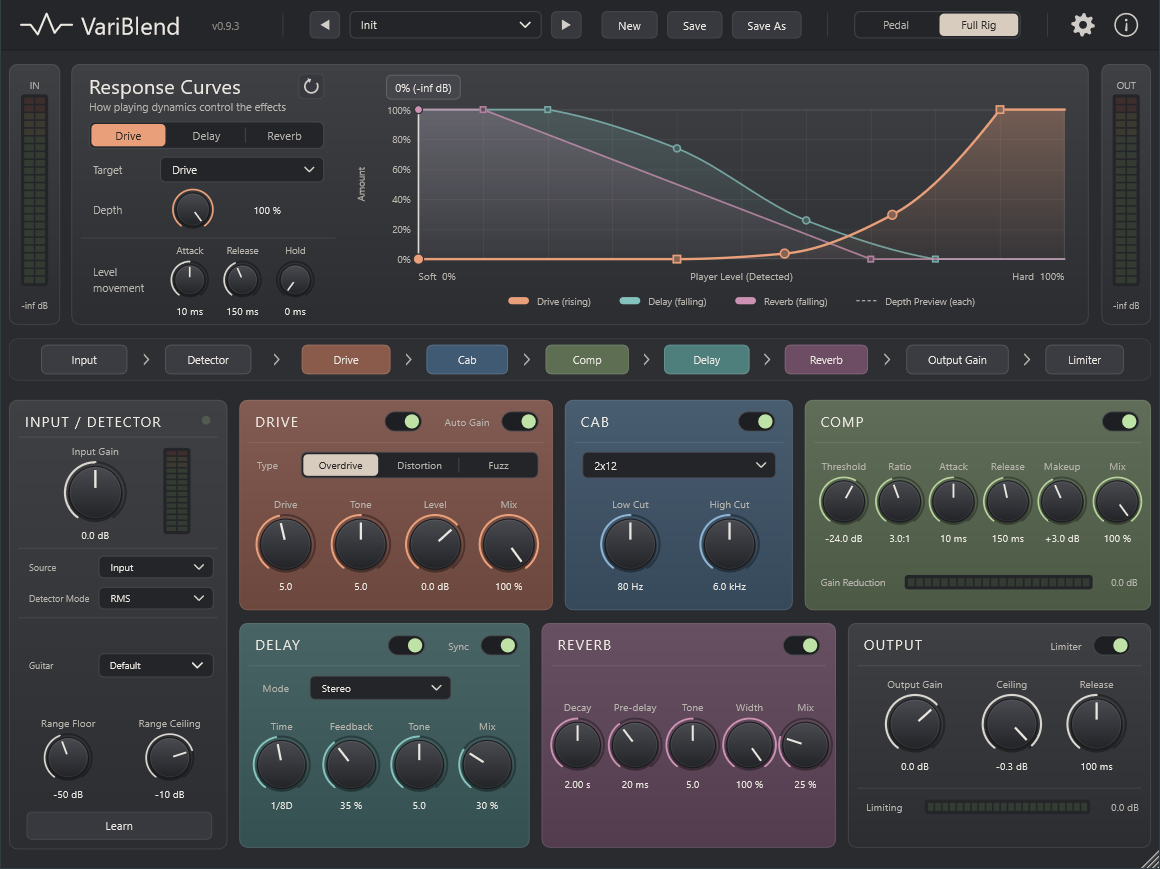
A detector follows your playing level from your softest to your hardest note. Each effect has a curve that decides how much of it you hear at every level.
Light picking stays clean and clear, with just a touch of space around it.
Hit the strings harder and overdrive, distortion or fuzz fades in, as smoothly as a cranked amp.
Delay and reverb step back while you play and swell up between phrases. No tap dancing on pedals.
These are VariBlend's default curves. Drag points to shape your own, just like curves in a photo editor.
Switch between the dry guitar and VariBlend while it plays. Same take, same position.
One strat, one take. Light chords stay glassy, hard strums break up.
Delay and reverb duck under the notes and bloom in every pause.
A solo that gets hotter and wider the harder it is played.
Six stages in a fixed, proven order, so it sounds right from the first note.
Follows your playing level and maps your own dynamic range from 0 to 100 %.
Every level-driven effect has its own curve, shaped freely with points.
Overdrive, distortion and fuzz that respond to your touch.
Speaker cabinet simulation for playing straight into your interface.
Evens out the jump between clean and driven playing.
Stereo echoes that follow your playing. Tuck them under soft notes, let them fill the gaps, or make them grow when you dig in for a solo.
A lush stereo space that moves with your dynamics. Keep it a subtle room, open it into a wide hall as you play harder, or let it swell in every pause.
Output gain and a safety limiter that catches peaks without lookahead.
Made to be played, live or in the studio.
| Plugin format | VST3. AU and other formats coming soon. |
|---|---|
| Windows | Windows 10 or 11, 64-bit |
| macOS | Apple Silicon and Intel Macs |
| Hosts | Any VST3 host, for example Ableton Live, Cubase, Reaper, Bitwig Studio, FL Studio and Studio One |
| Channels | Mono or stereo in, stereo out, optional sidechain input |
| Installation | Installer for Windows and macOS |
| Licence | Lifetime licence. Your serial arrives by e-mail. |
VariBlend is in its final round of testing.
Questions, or ideas for what VariBlend should do? Send a message.
Right after payment you receive an e-mail with your serial and the download links. Paddle, our reseller, sends the receipt separately. Install VariBlend, open it in your DAW, click Register and paste the serial.
Any DAW that loads VST3 plugins on Windows or macOS, such as Ableton Live, Cubase, Reaper, Bitwig Studio, FL Studio and Studio One. Logic Pro and GarageBand need the AU format, which is coming soon.
No. In Full Rig mode VariBlend has its own cabinet simulation, so you can plug your guitar into your interface and play. If you already use an amp sim, switch to Pedal mode and put VariBlend in front of it.
Yes. Hot pickups put out more level than single coils, so you match each guitar once: set Input Gain so your hardest playing peaks around −12 dB, press Learn and play from soft to hard, then save it as a guitar preset. Sound presets never change these settings, so every sound works with every guitar you have set up.
VariBlend is tuned for guitar, but the detector works with any source: bass, keys, vocals or drums. With the sidechain input, another track can drive the effects.
Your licence is personal. You can install VariBlend on the computers you use yourself, for example a studio desktop and a laptop for gigs.
There is no trial version yet. Listen to the demos, and remember the 30-day money-back guarantee: if VariBlend is not for you, you get your money back.
Within 30 days of purchase, request a refund at paddle.net or through the link in your receipt. See the refund policy.
Contact us from the e-mail address you used for the purchase, and we send it again.
Something else? Send a message.